Sea Frogs Salted Line Underwater Camera Housing for Sony FX3/FX30 Manual
WELCOME!
Thank you for choosing Sea Frogs Salted Line series housing. Please review this manual thoroughly to ensure optimal performance and avoid potential issues.
This manual applies exclusively to the Sea Frogs Salted Line series FX3/FX30 underwater camera housing with HDMI 2.0 Support.
The product must be used strictly according to the instructions provided. The manufacturer assumes no responsibility for damage or injuries resulting from improper use.
The illustrations in this manual are for general guidance. Always refer to the actual product for precise details.
The content of this manual is subject to change without prior notice.
We appreciate your purchase and are confident you will enjoy using your new underwater camera housing!
Stay Aware, Stay Safe
Precautions
Before using the waterproof housing for the first time, or when changing the lens port or O-ring, please be sure to conduct a water resistance test with the empty housing before loading the camera
Only use the silicone grease provided by Sea Frogs for the rubber O-ring! Do not use grease from other brands.
Stop using the housing immediately if you detect any leakage. Contact [email protected].
When traveling by air, keep the housing open to avoid pressure buildup, which makes it difficult to open later.
Avoid opening the housing in wet or sandy conditions. Keep the interior dry and tidy to prevent leaks and malfunctions.
Keep the housing out of direct sunlight to prevent overheating and damage to the polycarbonate material.
Store the housing in a cool, dry location, away from high humidity or direct sunlight.
Moving between places with large temperature differences within a short period of time may cause condensation (small water droplets) to form on the inner surface of the waterproof housing. If condensation occurs, remove the camera from the housing and wipe the water droplets with a soft dry cloth. Wait until the moisture has completely evaporated before use.
Do not damage the O-ring, or allow dust, dirt, etc. to accumulate between the O-ring and the waterproof housing to avoid water leakage.
Always dry the glass or acrylic ports and the LCD window using a soft cloth to prevent stains or salt residue from damaging the surface. Do not use solvents to clean the port, viewfinder, or LCD window.
If the housing won’t be used for a long time, remove the O-rings and store them separately. To ensure a tight and waterproof seal, replace the O-rings at least once a year.
After using the product in saltwater, rinse it with fresh water. To keep it from becoming stuck, take the port out of the housing at the end of each diving day.
Store the housing only after thoroughly cleaning and drying its surface.
Do not attach an external monitor directly to the housing using the “cold shoe” mount. The housing’s “cold shoe” mount is intended for flashlights, action cameras, and other small, lightweight accessories.
This section provides an overview of the technical specifications for your Underwater Camera Housing. It's your go-to resource for understanding the device's capabilities and limitations, ensuring you use it safely and effectively.
Operating temperature
0-40℃ (32-104℉)
Water resistance
40 meters / 130 feet
Buoyancy
Extremely positive (Hand strap required)
Housing bayonet mount type
90mm
Product dimensions, Weight (Body Only)
W203 x D135 x H153mm, 1040g
W8’’ x D5.3’’ x H6’’, 25.lbs
Waterproof construction
O-ring seal
Material
Polycarbonate, Stainless steel, Silicone
Key Features
M33 port (HDMI 2.0 Support)
Vacuum Pump System port (VPS-100 is optional)
Inbuilt leak detection sensor
Interchangeable port system
Dual Fiber-Optic port (Sea & Sea type)
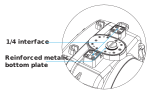
Two stainless steel mounting plates 1/4’’ thread
The reinforced metallic bottom plate
Dual-sided metal latch locking system
Detachable Pistol grip with 2-stage trigger (optional)
Push the red button of the safety lock to the neutral position and hold it there.
Simultaneously pull part A outward and backward.
Once part A reaches a certain position, pull part B outward, ensuring that the round shaft of B safely disengages from the metal hook on the back cover, completing the unlocking of a single safety lock.
After both the left and right safety locks are unlocked, remove the back cover.
Step-by-step guide to correctly installing and removing lens port. Proper technique is crucial to prevent damage to your equipment and ensure optimal performance.
Lens Port Installation
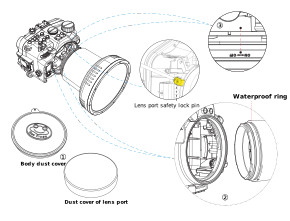
Remove the dust caps from the housing body and the lens port.
Check the groove on the housing body and lens port O-ring to ensure there is no damage or debris. Remove the O-ring (avoid stretching it), apply a small amount of silicone grease, and then reinstall it into the groove.
If the safety lock pin is installed, use a screwdriver to remove it from the housing. Ensure you use the appropriate tool to avoid damaging the screw.
Align the lens port’s positioning point with the housing body’s corresponding point. Push the lens port firmly, then rotate it clockwise until fully secured. If needed, use a screwdriver to install the safety lock pin inside the housing, ensuring you use the correct screwdriver to avoid damaging the screw.
Remember to use a tiny amount when applying grease to your O-rings. A thin, even layer is sufficient for the O-rings to shine without any visible grease patches. Over-lubricating can attract debris and potentially interfere with the sealing function of the O-rings.
Lens Port Removal
If the safety lock pin is installed, use a screwdriver to remove it from the housing. Ensure you use the appropriate tool to avoid damaging the screw.
Press the lens port release button and twist the lens port counterclockwise to detach it.
We recommend putting the camera into the housing in a room with low humidity and minimal dust. Avoid reopening the housing on a boat or near the shore.
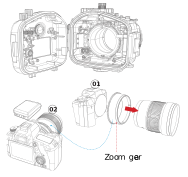
Attach the appropriate zoom gear to the camera lens. (Before installing the gear, it is necessary to detach the lens for certain lenses).
To connect external strobes via a fibre optic cable, install the SR-009 flash trigger (sold separately) onto the camera’s hot shoe.
Open the waterproof case, carefully place the camera inside, then close and lock the case.
If you install the camera with the lens and gear attached, ensure the zoom gear is firmly in place.
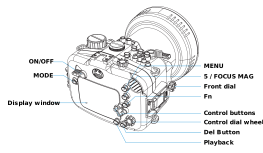
Test the buttons and dials on the waterproof case to confirm that all camera functions operate correctly.
Note:Note ①: Refer to the flash trigger manual (sold separately) for detailed instructions.
HDMI 2.0 Support
To connect an external underwater monitor via an HDMI 2.0 cable, unscrew the M33 accessory port cap from the camera housing, plug the cable into the accessory port, gently push the connection head into the accessory port until it cannot go further then tighten the screw.
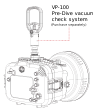
If you purchase the Sea Frogs VPS-100 Pre-Dive vacuum test system (sold separately), you can do an instant waterproof test. The vacuum test system manual includes complete instructions.
Note: To avoid accidents and equipment damage, always complete a waterproof test before using the camera housing underwater.
WARNING: THIS ACCESSORY IS NOT MEANT TO BE USED UNDERWATER AS PER MANUFACTURER INSTRUCTIONS! ANY ATTEMPT TO DO SO CAN CAUSE EQUIPMENT LOSS AND IS NOT COVERED BY THE WARRANTY!
Before each dive, carefully inspect the waterproof housing’s main (backplate) and port O-rings. If the O-ring has any debris, remove it and clean it with fresh water, then dry it using a lint-free soft cloth.
After cleaning, each O-ring should be lubricated with waterproof silicone grease. When applying grease to the O-rings, use only a tiny amount. A thin, even layer is sufficient to make the O-rings shine without visible grease patches. Over-lubricating can attract debris and potentially cause leakage.
If the housing will not be used for an extended period, remove the O-rings, lubricate them, and store them separately.
All housing O-rings must be replaced at least once a year or after 50 uses, whichever comes first.
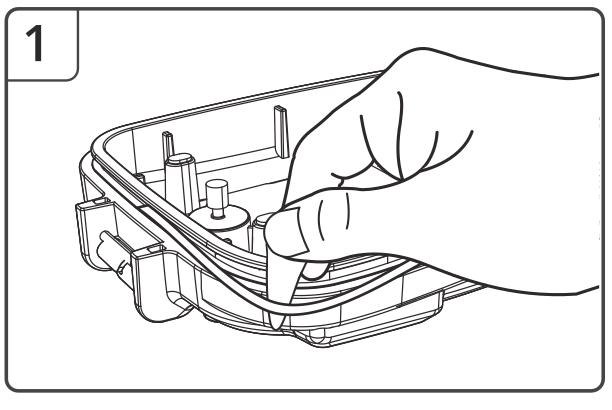
Note: Do not forcibly remove or use sharp, hard metal objects to remove the O-rings, as this may damage them or the case groove, leading to water leakage. DO NOT STRETCH THE O-RINGS!
The O-rings for the the M33 accessory port, VPS100 opening and shutter grip plug are maintained like the main O-rings.
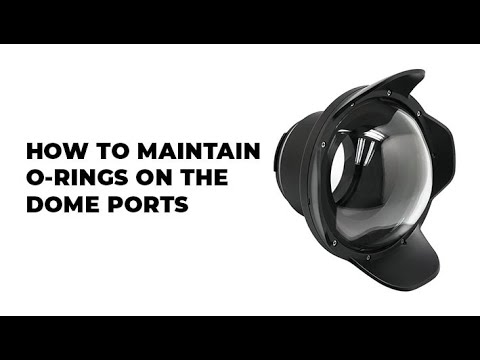
For Dome ports O-rings Maintenance (Not applicable to flat ports) please watch the following video:
Steps to Maintain main (backplate) and port O-rings:
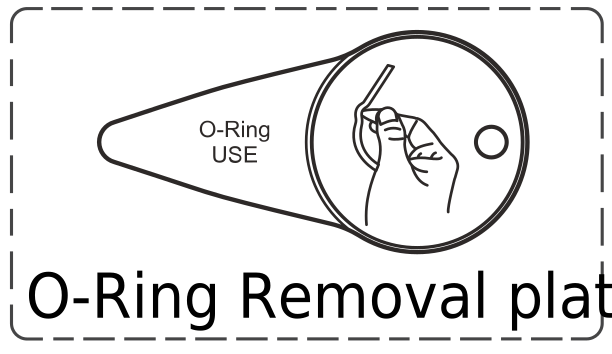
Use the provided O-Ring removal tool to take out the O-Ring.
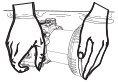
After cleaning, reapply the silicone grease to the O-ring. Use your fingers to distribute the grease evenly.
Check the groove of the backplate or port for debris. If debris is present, clean it using a lint-free soft cloth. Reinstall the lubricated O-ring back into the groove.
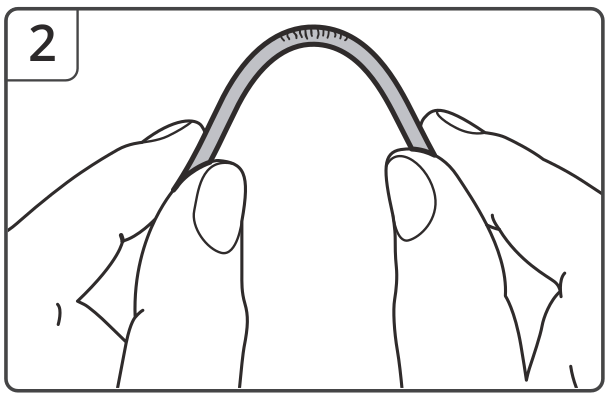
Do not stretch the O-rings.
Inspect the O-ring, remove old grease and debris, and clean it with fresh water. If the O-ring is damaged, replace it with a new one.
Steps to Maintain the secondary (housing body) O-rings:
Unless absolutely required, keep the secondary (housing body) O- ring in place. Instead, simply wipe it clean and apply silicone grease without removing it.
To install the secondary (housing body) O-ring, first ensure the groove on the housing body is completely dry. Carefully remove all grease from the O-ring without stretching it, then install it into the groove. Please note: even small traces of grease on the O-ring or in the groove can prevent proper installation.
Lubricating Push Buttons
The push-button O-rings are designed to last the lifetime of the housing when serviced regularly
Press and hold the push button fully.
Apply a small amount of silicone grease at the base of the push button shaft inside the housing.
Press and release the push button several times to distribute the lubricant into the O-ring.
If a push button becomes difficult to press or sticks when depressed, soak the housing in warm, soapy water for a few minutes. Then, operate the push button to restore functionality.
To prevent the buildup of salt, sand, or debris, flush the push buttons with fresh, clean water after every use. While submerging the housing, depress each push button to ensure proper cleaning.
Use only original Sea Frogs spare O-Rings and silicone grease.
Ensure the O-Ring is flat and not twisted when reinstalling it into the waterproof case groove.
Recheck the O-Ring and groove after installation to ensure no debris is attached.
Replace O-Rings at least once a year or after 50 uses to maintain the product’s waterproof performance.
After-Use Maintenance
Rinse the housing thoroughly in fresh water. While submerged, rotate the housing controls and press each button several times to flush out any salt or debris, ensuring smooth operation for future dives.
Use compressed air to remove any remaining freshwater from all external cavities of the housing, paying special attention to buttons and knobs.
Store the housing in a shaded area, protected from impact and overheating. If the shade is unavailable, cover the housing with a light-colored towel or cloth.
Treat the lens port surface like a camera lens. After use, rinse and gently dry the outside of the lens port to prevent water spots. Use only a soft cleaning cloth to avoid scratches. For cleaning, use a mild soap solution.
Proper storage of your underwater camera housing is crucial for maintaining its functionality and longevity
Post-Dive Cleaning
After each dive, remove the camera and close the waterproof housing. Soak it in fresh water for 15-30 minutes, operating all buttons and knobs to prevent salt buildup. Use compressed air to remove any remaining freshwater from all external cavities of the housing, paying special attention to buttons and knobs. If compressed air is unavailable, position the housing to allow any remaining water to drain naturally by gravity. Thoroughly clean and dry with a soft cloth.
Storage Environment
Store the housing in a dry, well-ventilated area away from direct sunlight.
Avoid Extreme Conditions
Do not store in high temperatures, cold, or humid places, and keep away from naphthalene chemicals or insecticides.
Long-Term Storage
If not using the housing for an extended period, remove the main O-Ring, lubricate them and store it separately in a plastic bag.
Our commitment to you extends beyond the purchase. Here's what you need to know about our after-sales service
Warranty Period
The product comes with a limited warranty period of 12 months from the date of purchase.
Note: The warranty does not cover O-rings
Warranty Repair Services
During the warranty period, the company will provide free repair services if the product is used according to the “Operating Instructions” and hardware failures occur due to product quality issues.
Please note Shipping costs to and from our service canter are not covered under the warranty and must be paid by the customer
Paid Repair Services
The following circumstances during the warranty period will result in paid repair services:
Failures or damages caused by incorrect operation or use in environments outside the product’s specifications.
Failures or damages caused by unauthorized disassembly, repair, or modification of the product.
Failures or damages caused by natural disasters, accidents, or other force majeure events after purchase.
Damages caused by improper maintenance by the customer.
Please note The customer is responsible for all shipping costs to and from our service center.
Post-Warranty Repair Regulations
For products requiring repair after the warranty period, the company will charge the cost of replacement parts. Before proceeding with repairs, the customer will be notified of the repair charges.
No repairs will be undertaken if the company’s technical engineers determine the product is too severely damaged or unrepairable.
Liability Disclaimer
The company is not responsible for any product damage or other property loss caused by improper operation or failure to follow the operating instructions.
Please note The customer is responsible for all shipping costs to and from our service center.
Address
5/F, 25 Hart Avenue, Tsim Sha Tsui, Kowloon, Hong Kong